



![图片[1]-OpenAI 连夜发新模型,我在 Lovart 拿它和「大香蕉」干了一架-AI Express News](https://www.aiexpress.news/wp-content/uploads/2025/12/20251220010350886-1766163830-1d2fe6996c961ea4dc86f5d37185f131-scaled.png)
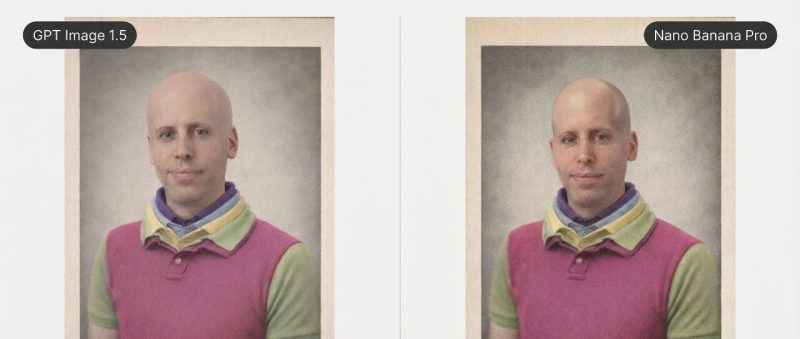
左边是 OpenAI 刚刚发布的 GPT Image 1.5,右边是谷歌的 Nano Banana Pro。
相同的提示词,你觉得哪个更好?
昨天我说,OpenAI 急了。
今天来点更硬核的。
三个场景深度实测,是骡子是马,拉出来遛遛。
改个发型
怎么测?
还是「Lovart」。
两个模型它都支持,GPT Image 1.5 刚上线几小时就能用了。手速真快。
开头那张图就是第一个测试。
要求很简单:把人物改成光头,其他元素不变。
上传 Sam Altman 的图片。
![图片[2]-OpenAI 连夜发新模型,我在 Lovart 拿它和「大香蕉」干了一架-AI Express News](https://www.aiexpress.news/wp-content/uploads/2025/12/20251220010353870-1766163833-1162a7e8347311219d0fb7f60b90ab10.png)
输入提示词。
Make him completely bald. Keep everything else exactly the same - the colorful polo shirt, the yearbook frame, the text at the bottom, the vintage photo style.
先看 OpenAI 的。
衣服颜色、层次、底部文字,一致性挺好。
但仔细看,头被拉长了,脑袋变大了,不太像原来的 Altman 了。
![图片[3]-OpenAI 连夜发新模型,我在 Lovart 拿它和「大香蕉」干了一架-AI Express News](https://www.aiexpress.news/wp-content/uploads/2025/12/20251220010354857-1766163834-6ebd151ee3c6028b56711c7ed055de57.png)
再看谷歌这边。
一致性同样不错,光头质感甚至更自然一些。
脸部特征的保持也稍微好一点,至少还能认出来是同一个人。
另外,修复了原图里左耳朵丢失的问题。
![图片[4]-OpenAI 连夜发新模型,我在 Lovart 拿它和「大香蕉」干了一架-AI Express News](https://www.aiexpress.news/wp-content/uploads/2025/12/20251220010355121-1766163835-12805ce0c7fde4bcfbbda5c1457cd20b.png)
个人感觉这轮,谷歌小胜。
两个模型在精准编辑上都保持了很好的一致性,但 Nano Banana Pro 在细节上更胜一筹。
接着把两张图拖到一个画布里。
在「Touch Edit」模式下选中(按住 Cmd(Mac)/ Ctrl(Windows)点击,或者直接在左侧工具栏切换到 Mark 模式选择)。
输入下面的提示词,发送。
将这两张图左右并排放置,中间留一条细细的白色分隔线。

左图上方添加标签 "GPT Image 1.5",右图上方添加标签 "Nano Banana Pro"。

标签样式:深灰色背景,白色文字,小圆角矩形,位于图片左上角/右上角。

整体背景为浅灰色 (#f5f5f5)。
![图片[5]-OpenAI 连夜发新模型,我在 Lovart 拿它和「大香蕉」干了一架-AI Express News](https://www.aiexpress.news/wp-content/uploads/2025/12/20251220010359339-1766163839-87d9717dcc29c20b8b7fe3aeb9cee7f2.gif)
就得到了文章开头的对比图。
一目了然。
四宫格图
第二个测试,套图一致性。
一个提示词,生成一张 2x2 的四宫格。
提示词:
A single 2x2 grid image in high-fashion editorial style, shot from bird's-eye view with LOMO Lc-a film aesthetics.

The scene: a sea of scattered black-and-white fashion magazine covers and billboard fragments on the ground. A stunning female model stands at the center of each panel - she is THE SAME PERSON across all four panels, with identical face, hairstyle, and body proportions.

Four seasons, four looks:
- Top left: SPRING - cherry blossom petals floating among the magazines, model in an oversized pastel blazer and flowing silk dress
- Top right: SUMMER - harsh sunlight casting dramatic shadows, model in a crisp white linen shirt and high-waisted shorts, barefoot
- Bottom left: AUTUMN - golden and crimson leaves scattered everywhere, model in a camel cashmere sweater and tailored trousers
- Bottom right: WINTER - light snow dusting the magazine covers, model in a black wool coat with leather gloves

CRITICAL: This is ONE single image divided into 4 panels, not 4 separate images. The model must be recognizably the same person in all panels - same face, same bone structure, same hair color and style.

Style references: Vogue editorial, Steven Meisel, high-fashion campaign. LOMO film grain, vintage color grading, dramatic yet elegant composition.
GPT Image 1.5 画的,说实话,多少有点失望。
虽然四格都完成了,模特的脸也一致。
但姿势太统一了,缺乏变化。
季节感也有点弱。
![图片[7]-OpenAI 连夜发新模型,我在 Lovart 拿它和「大香蕉」干了一架-AI Express News](https://www.aiexpress.news/wp-content/uploads/2025/12/20251220010401106-1766163841-c5f43c6f78a6833c39ae2933ea1db18b.png)
再看谷歌这边,差距肉眼可见。
同样是四季,Nano Banana Pro 的每一格都像是时尚大片。
季节元素也更到位。夏天阳光和阴影,秋天金黄落叶,冬天飘落的雪。
甚至还加上了文字标签。
![图片[8]-OpenAI 连夜发新模型,我在 Lovart 拿它和「大香蕉」干了一架-AI Express News](https://www.aiexpress.news/wp-content/uploads/2025/12/20251220010402401-1766163842-be786798518c1a9ad8d3625377382de7.png)
所以这一轮,谷歌完胜。
时代广场的巨人
第三个测试,文字渲染。
在 Lovart 里新建项目。
左侧工具栏选择 新增,图像生成器。
接着选择模型,参考图片从「画布」里选就行。
设置清晰度、尺寸,输入提示词,开始。
图像生成器 的好处是这些参数不用写进提示词里,可控性更强,非常推荐。
![图片[9]-OpenAI 连夜发新模型,我在 Lovart 拿它和「大香蕉」干了一架-AI Express News](https://www.aiexpress.news/wp-content/uploads/2025/12/20251220010403674-1766163843-9f1d22778b029cd0eea580f9040fb498.png)
A cinematic masterpiece photograph of a colossal man (exact face and body from reference) sitting like a god among the skyscrapers of Times Square at the blue hour.

THE GIANT: He sits confidently with legs crossed, wearing a black cashmere turtleneck and tailored dark jeans. One hand rests on a rooftop, the other holds up a massive iPhone toward camera - screen showing "AI信息Gap" in minimalist white typography on a soft pink-to-purple gradient.

THE CITY: Shot from a low drone angle looking up, making him appear even more monumental. Times Square stretches below him - yellow taxis like toy cars, pedestrians like ants, steam wisps rising from the streets.

KEY VISUAL ELEMENT: Behind him, ONE giant digital billboard displays "AI信息Gap" in glowing white text on deep black background.

LIGHTING: Golden hour meets blue hour. Warm tungsten glow from street level, cool blue sky above. Dramatic rim light on the giant's shoulders and hair.

Style: Blade Runner meets Apple commercial. This should look like a $10 million Super Bowl ad campaign.
OpenAI 的结果。
构图没问题,光影质感也到位。
但看文字,不但乱码,还少了个「息」字。
![图片[10]-OpenAI 连夜发新模型,我在 Lovart 拿它和「大香蕉」干了一架-AI Express News](https://www.aiexpress.news/wp-content/uploads/2025/12/20251220010405783-1766163845-37bd8ffd4e699a0218c27276e92c6fec.png)
谷歌的答案。
手机屏幕、广告牌,AI信息Gap,都正确。
![图片[11]-OpenAI 连夜发新模型,我在 Lovart 拿它和「大香蕉」干了一架-AI Express News](https://www.aiexpress.news/wp-content/uploads/2025/12/20251220010406652-1766163846-8b7bffa419f5a7728eb4b6b7889c2643.png)
这轮,几乎没有悬念。
Nano Banana Pro 的中文渲染能力,目前还是独一档。
其实,GPT Image 1.5 的英文渲染能力没大问题。
比如,我用「Text Edit」把「AI信息Gap」改成了「Lovart」。
不用重新生成,直接无痛修改任何文字。
![图片[12]-OpenAI 连夜发新模型,我在 Lovart 拿它和「大香蕉」干了一架-AI Express News](https://www.aiexpress.news/wp-content/uploads/2025/12/20251220010407155-1766163847-4930e2f53aac74c038c9c43e02e8f817.gif)
换成英文,这感觉就来了。
![图片[13]-OpenAI 连夜发新模型,我在 Lovart 拿它和「大香蕉」干了一架-AI Express News](https://www.aiexpress.news/wp-content/uploads/2025/12/20251220010408338-1766163848-16f24b96b8aa9abf87e9ec46252cb48d.png)
![图片[14]-OpenAI 连夜发新模型,我在 Lovart 拿它和「大香蕉」干了一架-AI Express News](https://www.aiexpress.news/wp-content/uploads/2025/12/20251220010409484-1766163849-9602c781d3c6126cfdb02f8b30089a7a.png)
不只是图片
测完图,我发现 Lovart 最近上线了 PPT 功能。
试试。
以经典论文「Attention Is All You Need」为例。
在 Lovart 对话框左下角点击 Slides,上传这份 PDF 文件。
右下角打开 Thinking 模式,让它深度思考。
然后输入提示词,发送。
![图片[15]-OpenAI 连夜发新模型,我在 Lovart 拿它和「大香蕉」干了一架-AI Express News](https://www.aiexpress.news/wp-content/uploads/2025/12/20251220010410395-1766163850-a25b0e80f9b5557544d95a0e43833ea8.png)
根据上传的《Attention Is All You Need》论文PDF,生成一份通俗易懂的解读PPT,25页。

目标读者:对AI感兴趣但没有深度技术背景的人。

内容结构:
- 封面:论文标题 + 「一篇改变AI历史的论文」
- 背景篇:2017年之前的序列模型困境(RNN/LSTM的问题)
- 核心篇:Transformer架构全解(Encoder-Decoder、Self-Attention、Multi-Head Attention、Position Encoding),用图解代替公式
- 意义篇:这篇论文如何催生了GPT、BERT、ChatGPT
- 尾页:论文原文链接、延伸阅读

视觉风格:
- 整体调性:科技教育风,像 3Blue1Brown 的视觉语言
- 主色系:深蓝渐变背景,亮橙色作为强调色
- 大量使用架构图、流程图、对比图
- 复杂概念用动画分步拆解的静态版呈现

设计原则:
- 一页一个概念,不堆砌
- 用类比解释术语(比如"Attention就像人类阅读时的注意力聚焦")
- 公式能不出现就不出现,用可视化代替

这份PPT要让完全不懂AI的人也能看懂Transformer是什么。
Lovart 疯狂思考,25 页 PPT 生成好了。
![图片[16]-OpenAI 连夜发新模型,我在 Lovart 拿它和「大香蕉」干了一架-AI Express News](https://www.aiexpress.news/wp-content/uploads/2025/12/20251220010410904-1766163850-e2ce8b14f8aeab0fa3c5919d7ac64f0f-scaled.png)
逆天。
25 页,一页不少。
深蓝背景,橙色强调,和我要求的一模一样。
从 RNN 的困境讲到 Self-Attention 的原理,再到 GPT、BERT 的诞生。
逻辑清晰,层层递进。
点开一页看看。
![图片[17]-OpenAI 连夜发新模型,我在 Lovart 拿它和「大香蕉」干了一架-AI Express News](https://www.aiexpress.news/wp-content/uploads/2025/12/20251220010412184-1766163852-14f70b5ef8637b14f46b06499da30311.png)
这页讲 Self-Attention,Query、Key、Value 的概念都是可视化拆解。
对 PPT 里的文字不满意?
用前面提到的「Text Edit」直接改。
比如这页全是英文,我想换成中文。
逐个替换,点击 应用修改。
![图片[18]-OpenAI 连夜发新模型,我在 Lovart 拿它和「大香蕉」干了一架-AI Express News](https://www.aiexpress.news/wp-content/uploads/2025/12/20251220010413549-1766163853-5540b92a26ec2b92f7216d532138f1fd.png)
搞定。
![图片[19]-OpenAI 连夜发新模型,我在 Lovart 拿它和「大香蕉」干了一架-AI Express News](https://www.aiexpress.news/wp-content/uploads/2025/12/20251220010414742-1766163854-2d20216361c075ac9e9bcd3b970e225d.png)
配图不对?
用「Touch Edit」指哪改哪。
比如这页右上角的大脑图标,我想换成芯片。
![图片[20]-OpenAI 连夜发新模型,我在 Lovart 拿它和「大香蕉」干了一架-AI Express News](https://www.aiexpress.news/wp-content/uploads/2025/12/20251220010415334-1766163855-c0752ef9f8cc9cce1d5e2e439c35a64b.png)
按住 Cmd 点击选中它,输入提示词。
把这个大脑图标换成一个发光的芯片图标,保持相同的青色风格。
![图片[21]-OpenAI 连夜发新模型,我在 Lovart 拿它和「大香蕉」干了一架-AI Express News](https://www.aiexpress.news/wp-content/uploads/2025/12/20251220010416812-1766163856-79ef5be4cb9e71aa3c33adf508af455c.gif)
大脑完美替换成了芯片,其他元素一点没变。
![图片[22]-OpenAI 连夜发新模型,我在 Lovart 拿它和「大香蕉」干了一架-AI Express News](https://www.aiexpress.news/wp-content/uploads/2025/12/20251220010417132-1766163857-5c53bcacb93f0fe5a9ae6b8ca00ad21f.png)
想替换背景?
用「Edit Elements」一键拆分图层。
比如这页「MODERN AI EQUATION」,有标题、图标、背景。
![图片[23]-OpenAI 连夜发新模型,我在 Lovart 拿它和「大香蕉」干了一架-AI Express News](https://www.aiexpress.news/wp-content/uploads/2025/12/20251220010418847-1766163858-df020802234b679b6fa4424f590b2305.png)
选中它,点击顶部的 编辑元素。
![图片[24]-OpenAI 连夜发新模型,我在 Lovart 拿它和「大香蕉」干了一架-AI Express News](https://www.aiexpress.news/wp-content/uploads/2025/12/20251220010419985-1766163859-9807108844795891f458b4dc5e5a247a.png)
整页 PPT 被拆成独立图层。
文字是文字,背景是背景。
单独编辑,互不干扰。
![图片[25]-OpenAI 连夜发新模型,我在 Lovart 拿它和「大香蕉」干了一架-AI Express News](https://www.aiexpress.news/wp-content/uploads/2025/12/20251220010420117-1766163860-5aedaad71a3411ba47e5952113ea551f.png)
这可是一份 25 页的 PPT。
强如谷歌 NotebookLM,最多也只能生成 15 页。
最后,点击顶部标题栏,还能导出 PPTX 或 PDF 格式。
![图片[26]-OpenAI 连夜发新模型,我在 Lovart 拿它和「大香蕉」干了一架-AI Express News](https://www.aiexpress.news/wp-content/uploads/2025/12/20251220010421880-1766163861-3397b6899f6c2fd88d841c7192698fff.png)
最关键的是,我开通了 Lovart 会员,生成这份 PPT,0 积分消耗。
太爽了。
划重点:活动依然还在,订阅 Basic 及以上,Nano Banana Pro 0 积分爽用一整年。
最近还新加了订阅 Pro 及以上,GPT Image 1.5 也是 0 积分用一整年。
12 月 20 日截止,有需要的上车抓紧。
结尾
三轮下来,谷歌 Nano Banana Pro 赢了两轮半。
精准编辑,小胜。
套图一致性,完胜。
中文渲染,独一档。
GPT Image 1.5 不是不行,英文场景表现不错,速度也快了不少。
但面对大香蕉,还差点意思。
两个都想试试?
目前能同时用上它们的地方,就「Lovart」。
我是木易,一个专注 AI 领域的技术产品经理,国内 Top2 本科 + 美国 Top10 CS 硕士。
相信 AI 是普通人的“外挂”,致力于分享 AI 全维度知识。这里有最新的 AI 科普、工具测评、效率秘籍与行业洞察。
欢迎关注“AI信息Gap”,用 AI 为你的未来加速。
原文链接:https://mp.weixin.qq.com/s/pY5i1_f58VmM9_5pnzNwFw













暂无评论内容